Xss prevention is the discipline that keeps cross-site scripting payloads from executing in the browser context of a real user, and it is layered by necessity. Every individual defense — output encoding, input validation, CSP, framework escaping, sanitization libraries, Trusted Types — has documented bypasses. The teams that ship XSS-resistant applications in 2026 stack mechanisms so a bypass of one is caught by the next, raising the cost of a successful exploitation chain until it is no longer worth the attacker's time. This guide walks the eight layers that compose a modern cross site scripting prevention program, the anti-patterns that make programs feel safe without being safe, and the per-feature checklist that turns the playbook into a concrete review item every pull request can pass through.
Why XSS Prevention Requires Layered Defenses
The temptation in any prevention discussion is to identify the one defense that handles the class and stop there. For prevent xss the temptation gets reinforced by every framework documentation page that says "auto-escaping is on by default" and every CSP article that says "a nonce-based policy stops inline script execution." Both statements are true. Neither is sufficient.
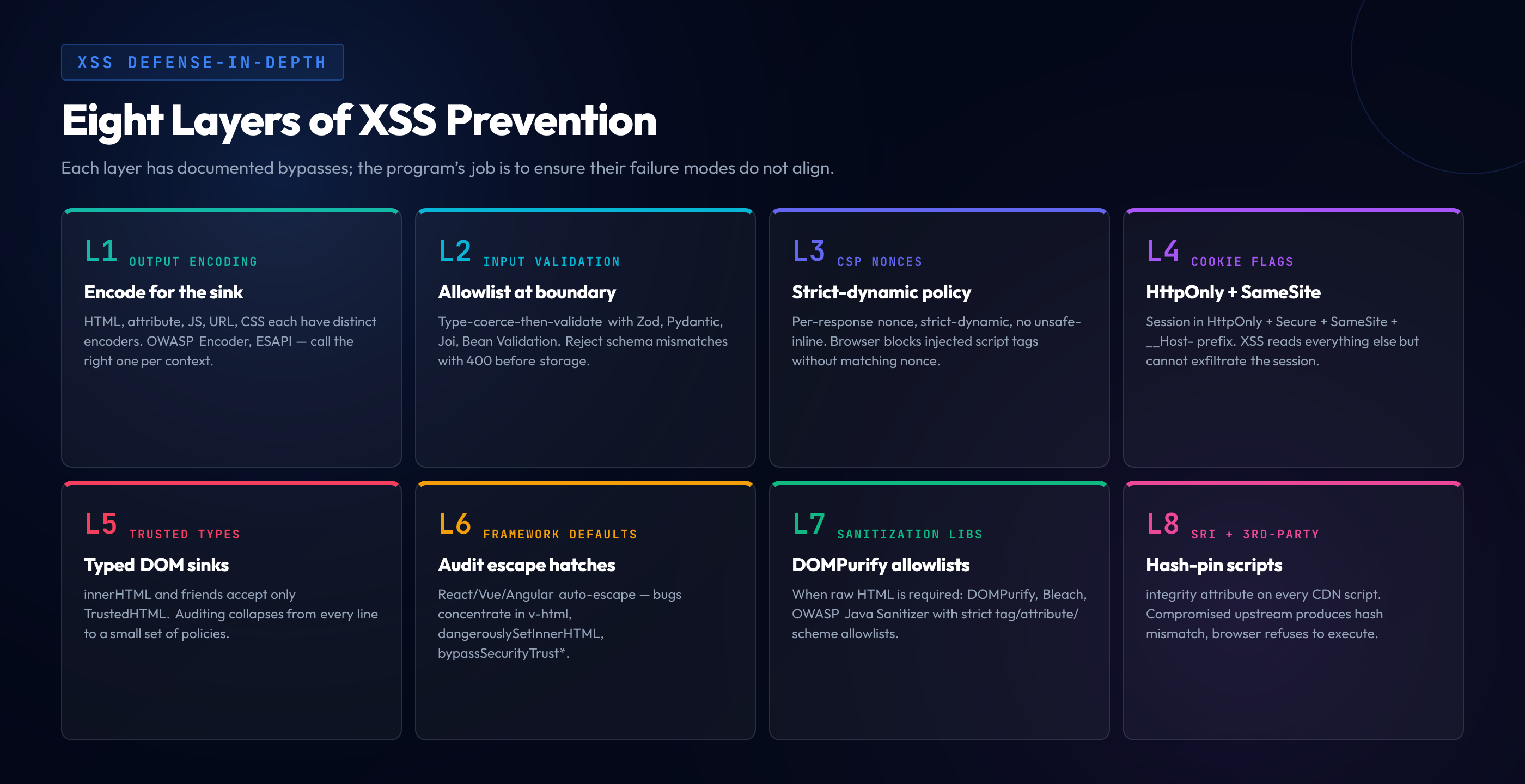
The reason no single defense suffices is structural. Output encoding fails when the developer reaches for a raw-rendering escape hatch like v-html, dangerouslySetInnerHTML, or Django's |safe. Input validation fails because the same string can be valid in one context and an XSS payload in another. CSP fails when the policy contains unsafe-inline, when an allowlisted CDN hosts a JSONP endpoint, or when a script gadget already on the page accepts attacker input. Framework auto-escaping fails when developers use the framework's escape hatch or when mutation XSS bypasses the parser. Sanitization libraries fail when they are misconfigured or when a new browser parser quirk produces a payload the sanitizer's tokenizer did not anticipate.
Each individual failure is rare. Stacked properly, the failure modes overlap rarely enough that the layered defense produces effectively zero successful XSS in a representative bug-bounty year. Stacked weakly, the same failure modes overlap regularly enough that a single missed escape hatch becomes the foothold a researcher needs.
The pillar guide on cross-site scripting covers the attack patterns; this guide covers the defense stack. The three siblings — reflected XSS, stored XSS, and DOM-based XSS — share most of this defense surface, but each has a primary layer. Reflected and stored XSS are dominated by output encoding plus framework defaults; DOM-based XSS is dominated by Trusted Types plus safe DOM APIs. CSP, sanitization libraries, and cookie/SRI defenses cut across all three.
Layer 1 — Context-Aware Output Encoding
The foundation of every XSS prevention program is context-aware output encoding: the application encodes untrusted data with the rules appropriate for the specific output context. A string is HTML-encoded for HTML body text, attribute-encoded for HTML attribute values, JavaScript-encoded for JavaScript string literals, URL-encoded for URL components, and CSS-encoded for CSS contexts. The same string, encoded for the wrong context, is still vulnerable; encoding is sink-specific.
The OWASP XSS Prevention Cheat Sheet codifies this discipline as seven rules that map untrusted-data placements to the encoding required. Rule #0 is the default — never insert untrusted data in script blocks, comment contexts, attribute names, tag names, or CSS contexts, because those positions either have no safe encoding or require sanitization beyond simple encoding. Rules #1 through #5 cover the placements that do have safe encodings: HTML body (HTML-encode), HTML attribute (attribute-encode all non-alphanumeric characters), JavaScript data values (JavaScript-encode inside a quoted string literal), HTML style (CSS-encode with only known-safe property values), and URL parameters (URL-encode). Rule #6 is sanitization for HTML markup contexts where actual HTML must be allowed but limited to a safe subset. Rule #7 covers DOM-based XSS by avoiding dangerous DOM sinks — covered by Layer 5's Trusted Types.
The discipline that turns the cheat sheet into actual code is to use a context-aware encoding library — OWASP Java Encoder, OWASP ESAPI, the Microsoft AntiXSS library, the Go html/template package — rather than a single global "escape function." A global HTML encoder applied to data flowing into a JavaScript context produces a string that is broken HTML-encoded but still vulnerable in JS. The library exposes context-specific functions — Encode.forHtml(s), Encode.forHtmlAttribute(s), Encode.forJavaScript(s), Encode.forUriComponent(s) — and the developer's job is to call the right function for the sink.
Most applications do not encode contexts manually because the framework's default rendering pipeline does it automatically (Layer 6). Manual encoding remains relevant for cases the framework cannot infer the context for: building HTML strings outside the templating system, generating JSON without the framework's serializer, constructing URLs with user-supplied parameters, and producing structured emails or PDFs.
Layer 2 — Allowlist Input Validation
Input validation is not a primary XSS defense — encoding the output for its sink is — but it is a defense-in-depth that catches anomalies before they reach storage, narrows the attack surface, and shrinks the blast radius when an output encoding bug ships. How to prevent xss answers always include input validation because validation handles cases encoding misses: input that bypasses the storage layer's expectations and reaches a code path where encoding is not applied, the second-order injection variant, the non-HTML sink the developer forgot to encode for.
The distinction that matters is between validation and sanitization. Validation rejects input that does not match an expected schema; sanitization modifies input to produce a safe variant. Validation is preferred for structured fields (email addresses, phone numbers, integer IDs, ISO dates) where the expected format is precise. Sanitization is necessary for free-text fields where rejection would break the user experience but raw markup must be denied.
The pattern is type-coerce-then-validate. The application parses the request body, coerces each field to its expected type (rejecting type mismatches at parse time), and validates each typed field against the schema's constraints (rejecting mismatches with a 400). Schema validation libraries — Zod, Joi, Yup, ajv for TypeScript/Node; Pydantic for Python; Bean Validation for Java; FluentValidation for .NET — encode the schema as code and produce a validated object the rest of the application can trust at the type level.
Validation that uses denylists rather than allowlists is the anti-pattern Layer 9 covers. Enumerating "bad characters" never holds — encodings, parser quirks, case variations, and Unicode equivalences mean every denylist has a documented bypass. Allowlist validation enumerates what is allowed and rejects everything else.
Layer 3 — Content Security Policy (CSP) Deep Dive
Content Security Policy is the browser-enforced layer that limits what a page can execute even if a payload reaches the rendered HTML. A correctly configured CSP turns "the attacker injected a script tag" from "the attacker is now executing JavaScript in the victim's session" into "the browser blocked the script tag and logged a violation." CSP is the most powerful single XSS mitigation a deployment can ship, and also the layer with the most operational complexity.
The CSP feature that matters most for xss attack prevention is the script-src directive in combination with nonces or hashes. The legacy approach — host-based allowlisting with script-src 'self' https://cdn.example.com — has been demonstrably bypassable for years. Google's research on CSP at scale concluded that host-based allowlists protect roughly nothing in practice because almost every popular CDN serves at least one JSONP endpoint, AngularJS template, or script gadget that lets an attacker run arbitrary code through the allowlist host. The protection comes from nonces, hashes, and the strict-dynamic mechanism layered on top.
A nonce-based CSP works as follows: every response generates a random nonce, the nonce is included in the CSP header, and the same nonce is set as the nonce attribute on every legitimate inline script the response emits. The browser executes scripts with a matching nonce; it blocks scripts without one. An attacker who injects a script tag through XSS does not know the nonce (freshly random per response), cannot guess it, and the injected script does not execute. The nonce must be cryptographically random per response, never reused.
// Express middleware: per-response nonce + CSP header
import crypto from 'crypto'

app.use((req, res, next) => {
  const nonce = crypto.randomBytes(16).toString('base64')
  res.locals.cspNonce = nonce
  res.setHeader(
    'Content-Security-Policy',
    [
      "default-src 'self'",
      `script-src 'nonce-${nonce}' 'strict-dynamic' https:`,
      "object-src 'none'",
      "base-uri 'self'",
      "frame-ancestors 'none'",
      "require-trusted-types-for 'script'"
    ].join('; ')
  )
  next()
})

// Template usage (e.g. in a server-rendered view):
// <script nonce="<%= cspNonce %>">...</script>
The strict-dynamic keyword extends nonces to dynamically loaded scripts: a nonce-trusted script can load additional scripts without per-script nonces, which makes the policy practical without sacrificing strictness. The fallback https: in the example is for older browsers that do not understand strict-dynamic; modern browsers ignore it when strict-dynamic is present. Hashes ('sha256-{base64hash}') are the alternative to nonces for inline scripts whose content is fixed at build time, appropriate for static analytics snippets and similar.
Bypasses that remain in well-configured CSP are narrower than in poorly-configured CSP. Script gadgets — pre-existing JavaScript that takes attacker-controlled input and executes it — bypass nonce-based CSP because the attacker manipulates an existing script's input rather than injecting a tag. Trusted Types (Layer 5) addresses script gadgets at the DOM API level. Dangling-markup attacks bypass CSP for data exfiltration even when script execution is blocked, and require careful HTML structure as a separate defense.
Operational discipline around CSP means deploying with Content-Security-Policy-Report-Only first, collecting violation reports through report-uri or report-to, fixing legitimate violations the report-only mode surfaces, and only then switching to enforcement. Production traffic always reveals legitimate inline scripts, third-party integrations, and dynamic loading paths the development environment did not exercise. CSP overlaps with the broader security misconfiguration discipline — missing CSP, weak CSP, and unsafe-inline directives all show up regularly in misconfiguration audits.
Layer 4 — HTTPOnly + Secure + SameSite Cookies
The cookie-attribute layer limits damage when XSS does land. An XSS payload can read any value accessible to JavaScript — DOM contents, localStorage, sessionStorage, and cookies that lack the HTTPOnly attribute. Cookies set with HttpOnly are not accessible to JavaScript; an XSS payload cannot read them or exfiltrate them. The session cookie of a logged-in user, properly set with HttpOnly, survives an XSS that reads everything else on the page.
The complete cookie attribute set for session cookies in 2026: HttpOnly (block JS access), Secure (only send over HTTPS), SameSite=Lax or SameSite=Strict (block cross-site cookie inclusion), and __Host- prefix for cookies locked to a single origin's host. The attributes compose: a cookie with all four is significantly harder to exfiltrate than one with none.
The pattern that breaks this defense is storing the session token in localStorage or in a non-HttpOnly cookie because "the SPA needs to read the token to attach it to fetch headers." The correct architecture is either to keep the session in an HttpOnly cookie and let the browser attach it automatically (with appropriate CSRF defenses for state-changing requests), or to use a token-binding approach where the bearer token is short-lived enough that exfiltration produces only minor blast radius. The "store the bearer token in localStorage so JS can read it" pattern is exploited by an XSS payload in 30 lines of code.
Layer 5 — Trusted Types API
Trusted Types is the modern browser API that mandates safe sinks at the DOM level. Dangerous DOM properties — innerHTML, outerHTML, document.write, eval, the script src property — accept only special typed values (TrustedHTML, TrustedScript, TrustedScriptURL) when Trusted Types is enforced. Plain strings passed to those sinks are rejected. The application opts into enforcement through the CSP directive require-trusted-types-for 'script', and every dangerous DOM operation must go through a registered policy that produces a typed value.
The architectural value of Trusted Types is that it shifts the "is this string safe to pass to innerHTML" question from "audit every line of code that touches innerHTML" to "audit the small set of policies that produce TrustedHTML." A medium application has hundreds of DOM API calls; it typically has a handful of policies. The audit surface shrinks by an order of magnitude, and enforcement is browser-level rather than convention-level.
// Define a Trusted Types policy that wraps DOMPurify
// for sanitized HTML, and reject everything else
if (window.trustedTypes && window.trustedTypes.createPolicy) {
  window.trustedTypes.createPolicy('default', {
    createHTML: (input) => {
      // Sanitize via DOMPurify before returning TrustedHTML
      return DOMPurify.sanitize(input, { RETURN_TRUSTED_TYPE: true })
    },
    createScript: (input) => {
      // Reject all string-to-script conversion at runtime
      throw new Error('Script string conversion is not allowed')
    },
    createScriptURL: (input) => {
      // Allow only known-safe script origins
      const url = new URL(input, location.origin)
      const allowedHosts = ['cdn.example.com', location.host]
      if (!allowedHosts.includes(url.host)) {
        throw new Error(`Script URL not allowed: ${url.host}`)
      }
      return input
    }
  })
}

// CSP header to enforce:
// Content-Security-Policy: require-trusted-types-for 'script';
//                          trusted-types default;
The named policy default is invoked automatically when a string is passed to a Trusted Types sink without explicit policy use. Named policies can be invoked explicitly for code paths that need different sanitization rules. The CSP trusted-types directive can restrict which policy names are accepted.
Trusted Types is the strongest single defense against DOM-based XSS specifically because DOM-based XSS lives in the client-side sinks that Trusted Types governs. The cluster sibling on DOM-based cross-site scripting covers that variant in depth. Browser support in 2026 is good in Chromium browsers (Chrome, Edge, Opera) but not yet in Firefox or Safari, so the pragmatic posture is to enforce it where supported and treat it as an additional layer rather than a replacement.
Layer 6 — Framework Defaults and Escape Hatches
Modern UI frameworks make XSS prevention the default. React, Vue, Angular, and Svelte all auto-escape interpolated values when they reach HTML output. The XSS bugs in framework-built applications concentrate in the escape hatches the frameworks provide for cases where developers explicitly need raw HTML rendering.
// React — JSX expressions auto-escape
function Comment({ text }) {
  return <p>{text}</p>        // safe — text is HTML-encoded
}

// React — dangerouslySetInnerHTML bypasses encoding
function CommentRaw({ text }) {
  return <p dangerouslySetInnerHTML={{ __html: text }} />  // unsafe
}

// Vue — interpolation auto-escapes
<p>{{ text }}</p>          <!-- safe -->

// Vue — v-html bypasses encoding
<p v-html="text"></p>          <!-- unsafe -->

// Angular — interpolation auto-escapes
<p>{{ text }}</p>          <!-- safe -->

// Angular — bypassSecurityTrustHtml bypasses encoding
this.html = this.sanitizer.bypassSecurityTrustHtml(text)  // unsafe
The pattern is consistent: the default rendering is safe, the named escape hatch bypasses safety, and the developer is responsible for sanitization. Every appearance of an escape hatch should be a code-review trigger — the reviewer asks where the input came from, what sanitization it received, and whether the use case justifies bypassing the framework default.
The most common failure mode is the developer who reaches for the escape hatch to render Markdown or a sanitized comment, and passes input directly without sanitization on the assumption that "this is internal content." The defense is to sanitize at the escape hatch boundary every time, with a library configured for the specific allowlist that use case requires.
Layer 7 — Sanitization Libraries Deep Dive
When the application has a legitimate need to render HTML containing formatting (bold, italic, links) — typical for comments, rich-text editors, Markdown renderers — the answer is a sanitization library with a strict allowlist. The library tokenizes input, walks the resulting tree, removes tags and attributes not on the allowlist, and emits a safe HTML string. The library does the parsing correctly; the developer specifies what is allowed.
DOMPurify is the standard sanitization library for browser and Node.js environments:
import DOMPurify from 'dompurify'

// Strict configuration for comment rendering:
// only basic formatting tags, only safe href schemes
const cleanHtml = DOMPurify.sanitize(userInput, {
  ALLOWED_TAGS: ['b', 'i', 'em', 'strong', 'a', 'p', 'br'],
  ALLOWED_ATTR: ['href'],
  ALLOWED_URI_REGEXP: /^(?:https?|mailto):/i,
  FORBID_TAGS: ['style', 'script', 'iframe'],
  FORBID_ATTR: ['onerror', 'onload', 'style']
})
The allowlist approach is preferred over the denylist approach because the universe of allowed tags is finite and known, while the universe of dangerous tags is infinite. Adding a feature requires explicitly extending the allowlist — a code review touchpoint.
For Python, Bleach is the equivalent library:
import bleach

clean = bleach.clean(
    user_input,
    tags=['b', 'i', 'em', 'strong', 'a', 'p', 'br'],
    attributes={'a': ['href']},
    protocols=['http', 'https', 'mailto']
)
For Java, the OWASP Java Encoder pairs with the OWASP HTML Sanitizer. Encoder handles context-aware encoding; Sanitizer handles allowlist-based rich-text cleanup:
import org.owasp.encoder.Encode;

// Context-aware encoding for direct output
String htmlOutput = Encode.forHtml(userInput);
String attrOutput = Encode.forHtmlAttribute(userInput);
String jsOutput   = Encode.forJavaScript(userInput);
String urlPart    = Encode.forUriComponent(userInput);

// For rich-text rendering, use OWASP HTML Sanitizer
import org.owasp.html.PolicyFactory;
import org.owasp.html.Sanitizers;

PolicyFactory policy = Sanitizers.FORMATTING.and(Sanitizers.LINKS);
String safeHtml = policy.sanitize(userInput);
For Node.js, sanitize-html is an alternative to DOMPurify when sanitization happens server-side without a DOM:
import sanitizeHtml from 'sanitize-html'

const clean = sanitizeHtml(userInput, {
  allowedTags: ['b', 'i', 'em', 'strong', 'a', 'p', 'br', 'ul', 'ol', 'li'],
  allowedAttributes: {
    'a': ['href', 'rel', 'target']
  },
  allowedSchemes: ['http', 'https', 'mailto'],
  allowedSchemesByTag: {},
  allowProtocolRelative: false,
  enforceHtmlBoundary: true
})
The configuration patterns share the same shape: allowlist tags, allowlist attributes per tag, allowlist URI schemes, reject everything else. The discipline is to start narrow and broaden only when a specific feature requires it.
Sanitization libraries fail when the underlying parser does not match the browser's parser. Mutation-XSS exploits these mismatches: a payload that looks safe to the sanitizer's tokenizer parses differently in the browser. DOMPurify mitigates this by running inside the browser DOM, using the actual parser. Server-side sanitization libraries that use their own parser are more exposed and need to be kept current.
Layer 8 — Subresource Integrity for Third-Party Scripts
Subresource Integrity (SRI) protects against XSS coming through compromised third-party scripts. When an HTML document loads a script from an external host, the script tag includes an integrity attribute with a cryptographic hash of the expected content. The browser fetches the script, computes the hash, and refuses to execute on mismatch. A compromise of the upstream provider or a man-in-the-middle that injects malicious JavaScript produces a hash mismatch and the browser blocks execution.
<script
  src="https://cdn.example.com/widget.js"
  integrity="sha384-{base64hash}"
  crossorigin="anonymous"></script>
SRI matters because third-party scripts have been the foothold in high-impact XSS-adjacent incidents — the British Airways Magecart compromise of 2018 was a third-party script modification that exfiltrated payment card data from the checkout page. SRI does not prevent the upstream compromise; it ensures the page breaks rather than silently executing malicious code. The tradeoff: the integrity hash must be updated every time the third-party script legitimately changes.
The pragmatic deployment uses SRI for version-pinned CDN libraries and hosts frequently-changing scripts from infrastructure under your control. Tag managers and analytics are hardest to apply SRI to because content changes without version-bumped URLs; for those, the defense moves up the stack — strict CSP that limits what tag-managed scripts can do, plus a content-review process for new tags.
Common XSS Prevention Anti-Patterns
The patterns below appear regularly in xss mitigation programs that feel like prevention but produce no measurable defense.
Blacklist filters that strip "bad" strings. A sanitization function that does input.replace(/<script>/gi, '') or maintains a list of "dangerous" substrings. The pattern fails because encodings, case variations, parser quirks, attribute handlers (onerror=, onload=, javascript: URIs), SVG events, data: URLs, and the hundred other ways HTML produces script execution are not enumerable. Every blacklist has a documented bypass.
Regex sanitization of HTML. HTML is not a regular language; regex sanitization always misses cases. Sanitization library maintainers have spent years building tokenizers that handle comment closures, CDATA sections, mutation-XSS triggers, and attribute parsing — using a real sanitizer is a fraction of the engineering cost of trying to match HTML with regex.
Input-time encoding. HTML-encode every string at request parse time, store the encoded version, skip encoding on render. The pattern fails because the same string needs different encodings for different sinks (HTML body vs JavaScript vs URL), the stored data is no longer canonical (corrupting search, comparison, exports), and the second use may not be HTML at all. Encoding belongs at the output sink.
"We use a WAF." WAFs can stop the laziest payloads but are bypassable through encoding variations, payload chunking, and protocol evasion. Bug-bounty hunters routinely deliver bypass-of-WAF payloads in the same report as the underlying XSS. WAF is appropriate as a last-resort defense while the real fix ships, never as primary mitigation.
"Our framework prevents XSS." The team uses React or Vue and points to auto-escaping. Layer 6 covered why this is not sufficient: the escape hatches exist, get used, and become the foothold.
"We sanitize on input, so we are safe." Input sanitization is sink-agnostic — the sanitizer cannot know whether the data will flow to HTML, JavaScript, SQL, or shell, and the encoding required for each sink differs. Validate at input (allowlist schema), encode at output (per sink). The broader principle connects to injection prevention: every interpreter has its own escape rules.
The XSS Prevention Checklist for Every New Feature
The checklist below is the per-feature review item that turns the layered playbook into a code-review touchpoint. Every pull request that adds user-facing rendering, accepts user input, or modifies the security posture of an existing rendering path passes through these questions. The discipline pairs with the broader practice covered in secure code review best practices.
- Where does user-controlled data appear in this feature? List every input source — request parameters, headers, cookies, file uploads, third-party API responses, database fields written by other users — and trace each through the code paths it touches.
- What sinks does each user-controlled value reach? Map every flow from source to sink. HTML body, HTML attribute, JavaScript string, URL, CSS, JSON for client-side parsing, SQL, shell — each sink has its own encoding requirements.
- Is the rendering using the framework default or an escape hatch? If escape hatch (
dangerouslySetInnerHTML,v-html,bypassSecurityTrust*, manual HTML string construction), the input must be sanitized through a configured allowlist library before reaching the escape hatch. - Is input validation present at the boundary? Schema validation library (Zod, Pydantic, Joi, Bean Validation) with an allowlist schema. Type coercion happens before validation; constraint validation happens after.
- Does the page deliver a strict CSP? Nonce-based, strict-dynamic, no
unsafe-inline, nounsafe-eval, object-src 'none', base-uri 'self', frame-ancestors restrictive. Every inline script and style carries the per-response nonce. - Are session cookies set with the full attribute stack? HttpOnly, Secure, SameSite=Lax or Strict, __Host- prefix where applicable. No bearer tokens in localStorage for long-lived sessions.
- Are Trusted Types enforced for client-side DOM operations? CSP
require-trusted-types-for 'script', named policies for the small set of legitimate sink consumers, default policy that runs sanitization on any string-to-sink path. - Are third-party scripts pinned and SRI-protected? Version-pinned URLs, integrity attribute with the current hash, crossorigin attribute set, hash updated through the same code-review process as code changes.
- Has the feature been tested with XSS payloads in CI? SAST coverage of the new code, DAST coverage of the new endpoints, and a representative payload corpus run against the staging deployment before merge.
- Is there a rollback path if a regression ships? Feature flag for the new rendering path, monitoring of CSP violation reports for unexpected spikes, runbook entry for "we shipped XSS, here is how we contain it within the next deploy cycle."
Layered XSS Prevention Is a Team Discipline, Not a Library Choice.
A team that ships React, sets a CSP, and uses DOMPurify still ships XSS when the discipline of "framework default, audit the escape hatch, encode for the sink, validate at the boundary, enforce Trusted Types, configure the CSP nonce per response" is not part of how features get reviewed. SecureCodingHub builds the per-layer fluency that turns the playbook in this guide into something every reviewer applies at PR velocity. If your last pentest report had an XSS finding under "high severity" and the fix was a one-line change, the underlying program needs the layers behind that one line to compose more reliably. We would be glad to show you how our training program changes the input side of that pipeline.
See the PlatformClosing: The Stack Is the Defense
The eight layers in this guide are not alternatives — they compose. A team that ships only output encoding fails when a developer reaches for a raw-rendering escape hatch. A team that ships only CSP fails when an allowlisted host serves a JSONP endpoint. A team that ships only Trusted Types fails in browsers that do not yet support the API. A team that ships only framework defaults fails the day someone uses v-html for a Markdown rendering feature. Each layer has documented failure modes; the program's job is to ensure they do not align.
The cluster of XSS variants — reflected, stored, DOM-based — sits inside the broader OWASP A03 injection family and inherits its discipline: untrusted data, downstream interpreter, separate channels for code and data. XSS is the variant where the interpreter is the browser, the channels are HTML and JavaScript, and the prevention is the layered stack above. The pillar on cross-site scripting covers the attack surface; this guide covers the defense. The teams that have largely closed their XSS surface in 2026 share the practice of treating each layer as part of a compound rather than a sufficient mitigation, auditing escape hatches at every PR, and measuring the program by the absence of XSS findings rather than the presence of any single defense.